Use official records to test a quote, then check the details that a transaction table cannot show.
Before buying an off-plan property in Dubai, compare the quoted price with recent recorded sales for similar units. A launch price or portal listing tells you what a seller is asking. It does not establish what comparable buyers have agreed to pay.
DLD off-plan transactions provide a useful starting point. This guide shows how to find the records, narrow the comparison and calculate a consistent price per square foot. It includes two real One.B Tower records retrieved on 19 October 2026. The example demonstrates a method; it is not a valuation or a recommendation to buy.
Where to Find Official DLD Transaction Records
Start at the Dubai Land Department Real Estate Data page. The public Transactions tab was accessible without signing in when checked on 19 October 2026. Follow any verification prompt shown. For previous-year data, use the data.dubai link provided on that page.
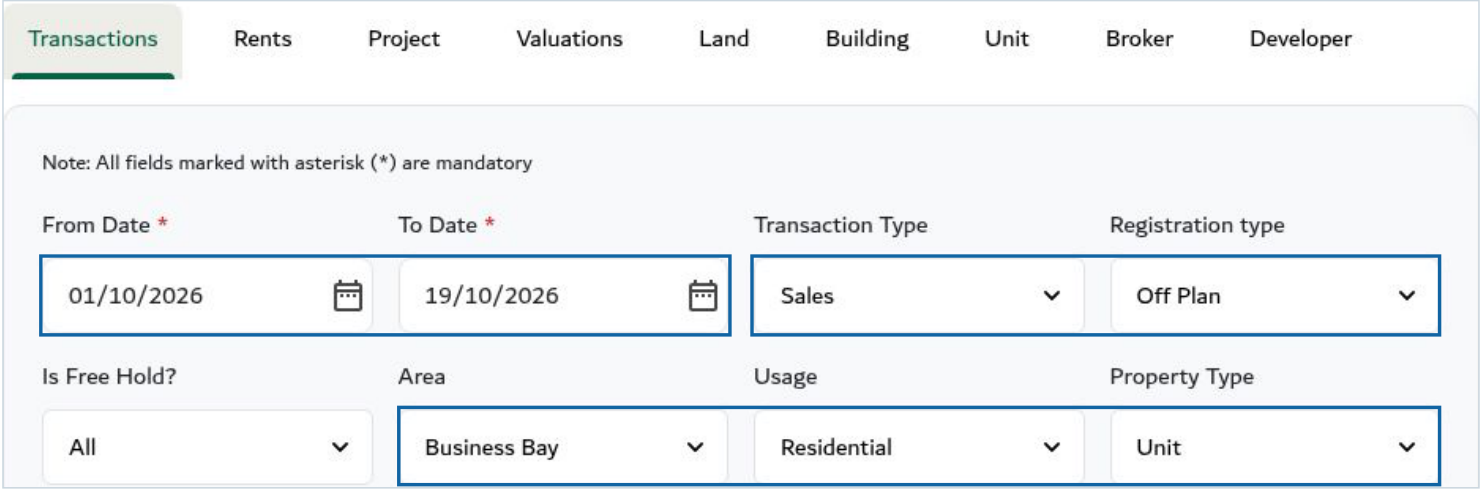
- Set the period. Enter From Date and To Date. Start with a recent period relevant to your proposed purchase; widen it if too few suitable records appear. Record the exact dates rather than simply calling the data "recent".
- Choose sales and off-plan. Set Transaction Type to Sales and Registration type to Off Plan. Keep Ready records separate. A mortgage or gift is not an ordinary sale-price comparable.
- Narrow the property search. Select the Area and Usage. For the apartment example here, Usage is Residential and Property Type is Unit. The returned subtype identifies Flat; do not assume every Unit is an apartment.
- Search, save and refine. Complete the displayed CAPTCHA if required, select Search, then use Download as CSV. Keep the original export and retrieval date. Filter the exported rows by project, subtype, rooms and a suitable size range; these are not all separate controls in the public search form.
Source check: the live search controls, returned rows and original CSV were inspected on 19 October 2026. Interface labels can change. Use the recorded transaction date as supplied; it need not be the booking or contract-signing date.
How to Filter Comparable Off-Plan Transactions
A useful comparison starts with the same registered project and, where you can verify it, the same building or phase. Match apartments with apartments, then compare bedroom count and similar areas. A district-wide average can mix different products and hide the details that matter to your unit.
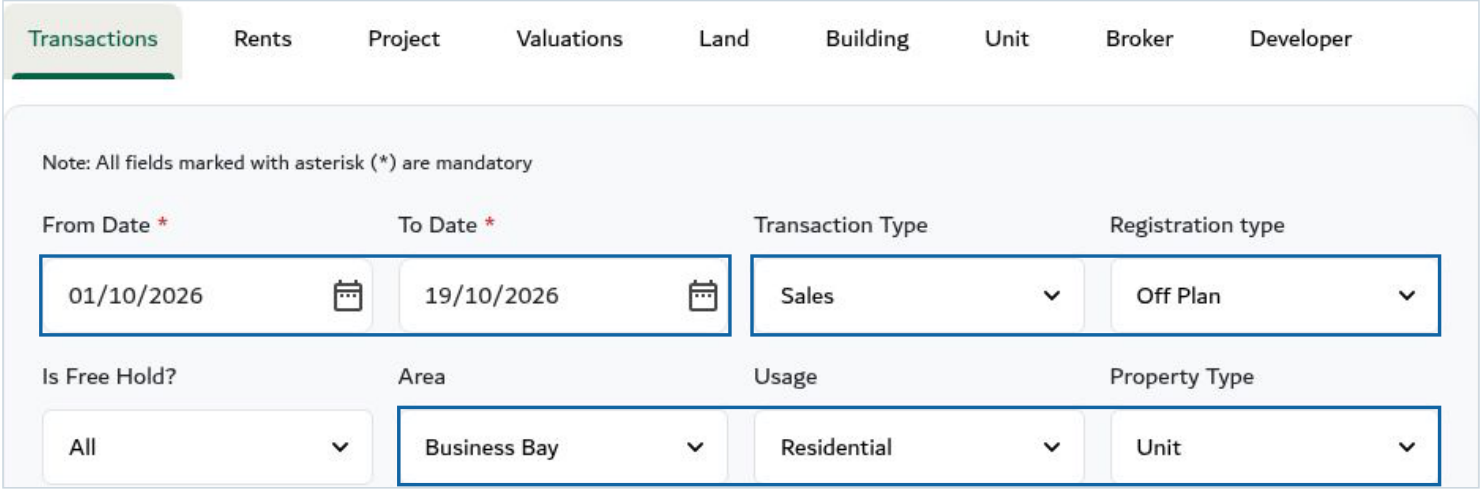 Figure 1. Public DLD search filters. Blue outlines identify the date window, Sales plus Off Plan selections, and area/usage/type selections. Captured 19 October 2026. Project, room and size screening is applied to the exported rows. Source: DLD Real Estate Data.
- Separate registration categories. An Off-Plan record should not be mixed into a Ready-property average. Keep the transaction subtype too. Registration type alone does not tell you whether the seller is a developer or an investor.
- Match the area basis. Check both Transaction Size and Property Size. Do not divide a whole-unit price by a partial-interest area, or compare internal-only brochure space with a differently defined registered area.
- Check what is missing. Floor, view, layout, finish, incentives and payment position need supporting unit documents. Mark unverified details as unknown; do not assume they match.
- Widen the sample transparently. If the same project has too few records, extend the period or examine comparable projects separately. Explain the change rather than quietly mixing them into one average.
Asking Prices vs. Recorded Transaction Prices
An asking price is the amount currently requested by a developer or resale seller. A recorded transaction amount is the value shown in the DLD record for that transaction. Neither number alone proves the fair value of your proposed purchase.
Compare the current written quote with relevant recorded sales, but keep the quote date, exact unit and commercial terms alongside it. An asking-price sample is not the same as an achieved-price average. Recorded amounts do not show every incentive, fee, outstanding instalment or side of the payment schedule.
How to Calculate Price per Square Foot
Use the amount and area belonging to the same transaction. In the two records below, Transaction Size and Property Size agree. We use Transaction Size as the denominator and show both fields so the choice is visible.
Area in sq ft = area in sq m x 10.7639
AED per sq ft = recorded amount in AED / converted transaction area
Keep full precision during calculation, then round the displayed result. A conversion does not make differently defined areas comparable.
Compare the Recorded Transactions
Worked example: One.B Tower, Business Bay. Retrieved 19 October 2026. Search window: 1-19 October 2026; Transaction Type: Sales; Registration type: Off Plan; Area: Business Bay; Usage: Residential; Property Type: Unit; Is Free Hold?: All.
The search returned four records. We retained the two rows with Project = One.B Tower, subtype = Flat, rooms = 2 B/R and transaction area within 160-170 sq m. These are provisional comparables because floor, view and commercial terms have not been matched.
| Comparison field | Record A | Record B |
|---|---|---|
| Transaction number | 102-83246-2026 | 102-86467-2026 |
| Transaction date, as displayed | 1 October 2026 | 15 October 2026 |
| Project / area | One.B Tower / Business Bay | One.B Tower / Business Bay |
| Type / subtype | Sales / Sell - Pre registration | Sales / Sell - Pre registration |
| Registration / tenure | Off-Plan / Free Hold | Off-Plan / Free Hold |
| Property / rooms / parking | Unit / Flat / 2 B/R / 1 | Unit / Flat / 2 B/R / 1 |
| Transaction size (sq m) | 166.90 | 166.85 |
| Property size (sq m) | 166.90 | 166.85 |
| Converted transaction size (sq ft) | 1,796.49 | 1,795.96 |
| Recorded amount (AED) | 3,738,000.00 | 3,618,000.00 |
| Calculated AED per sq ft | 2,080.72 | 2,014.53 |
Record A calculation: 166.90 x 10.7639 = 1,796.49491 sq ft. AED 3,738,000 / 1,796.49491 = AED 2,080.72 per sq ft. Record B uses the same method. Source: DLD public records and CSV export.
Two records are too few to establish a market trend or a valuation range. The difference is not proof that the project became cheaper between the two dates. Unobserved unit features or terms may explain it.
Read the Evidence Behind the Example
These are three horizontal views of the same four-row public DLD result, in the same order. Blue outlines mark Record A in the first row and Record B in the fourth row. The original CSV ties all columns together.
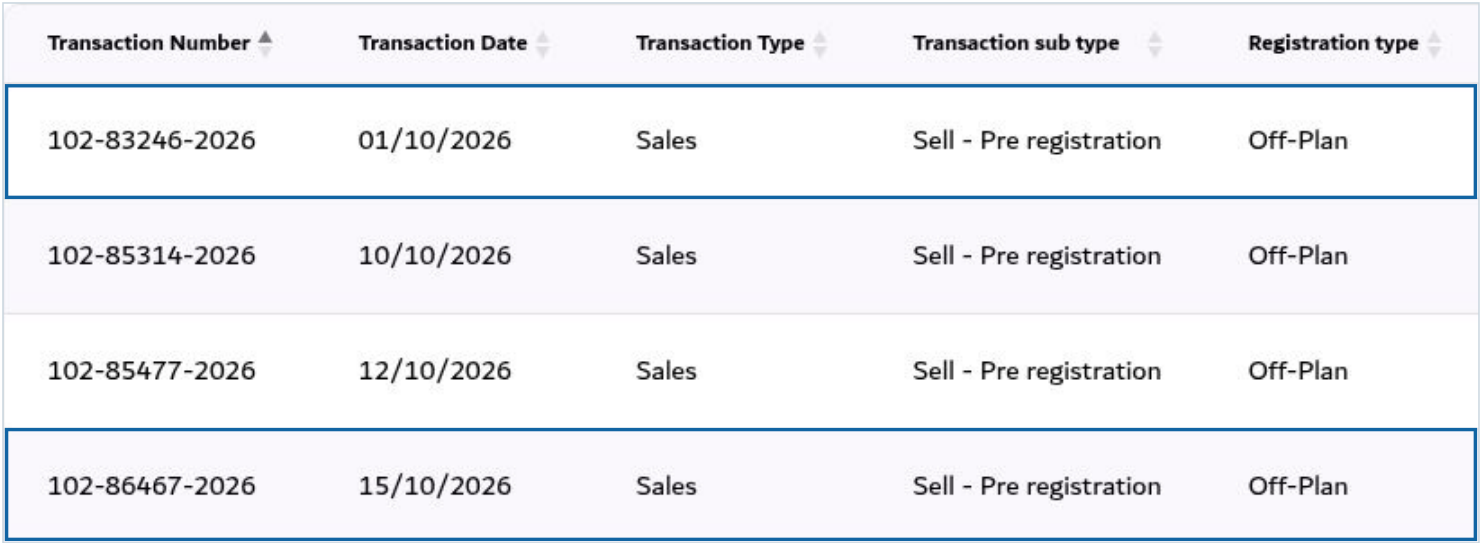 Figure 2A. Preserve the transaction number, date, subtype and registration category.
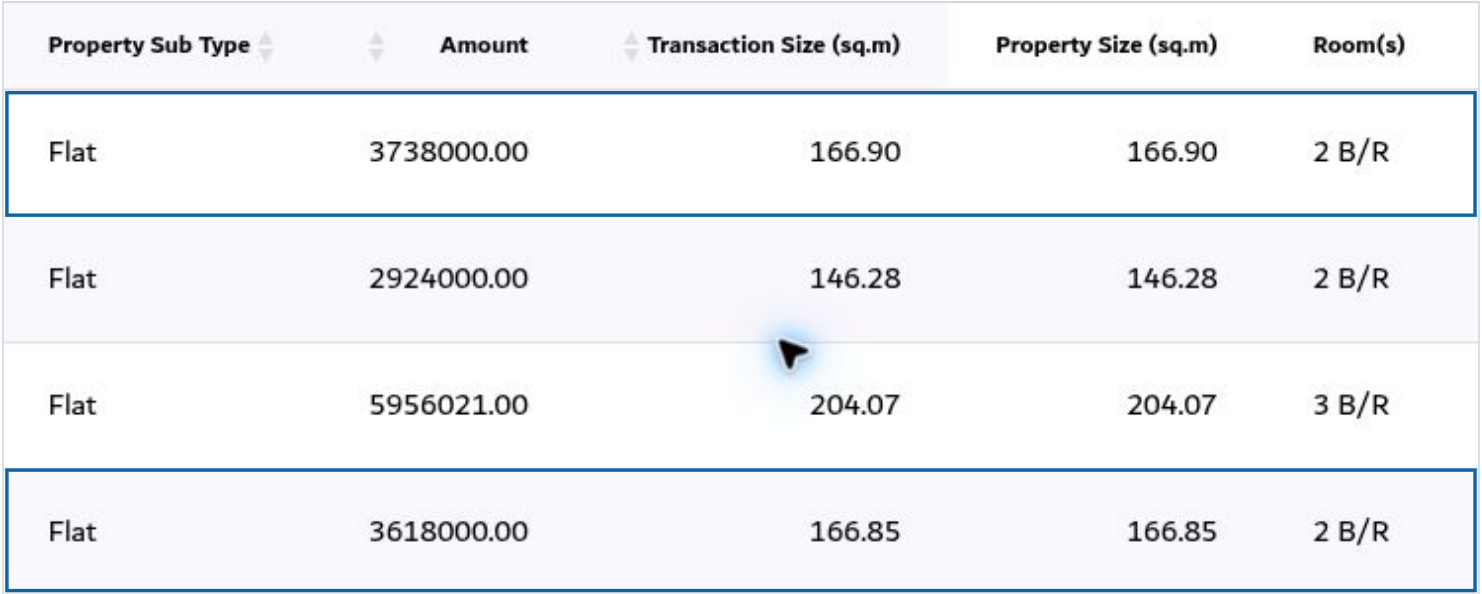 Figure 2B. Read the recorded amount, both area fields and bedroom label.
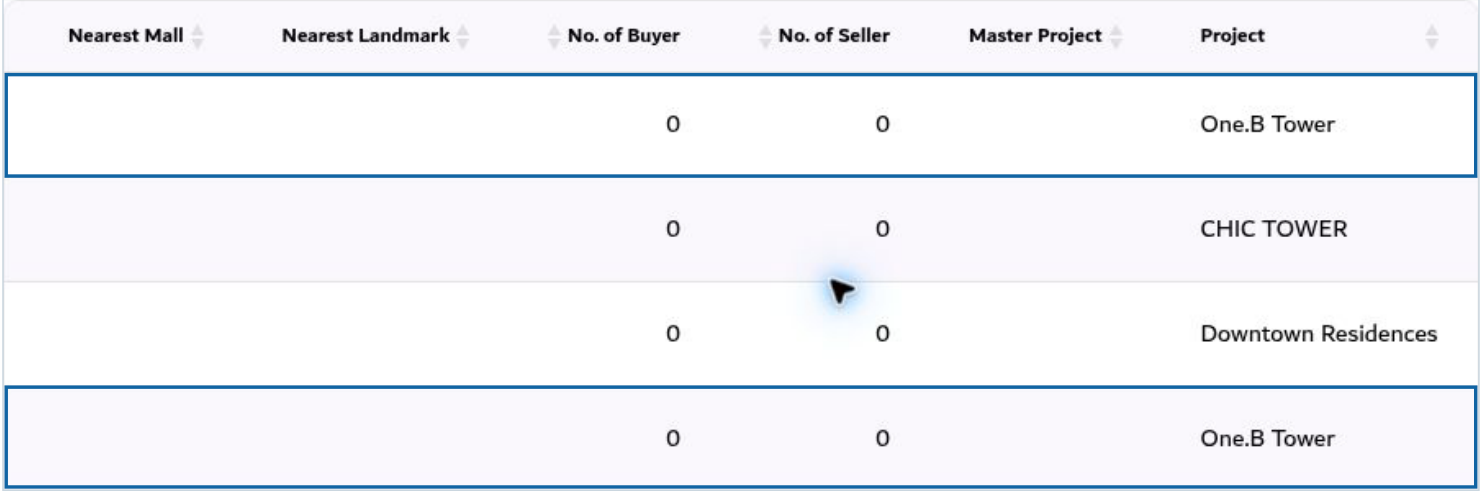 Figure 2C. Match the project; the other two rows belong to different developments.
Captured 19 October 2026 from DLD Real Estate Data. The CHIC TOWER row is excluded because the project differs. Downtown Residences is excluded because both project and room count differ. Zeros in buyer/seller-count fields do not establish an arm's-length sale or reveal the parties' relationship.
What DLD Transaction Data Cannot Tell You
Official records do not replace a current offer, due diligence or valuation. A small sample and missing fields limit what you can conclude.
Unit Availability and Current Pricing
Off-plan transaction history in Dubai records past transactions; it is not a live inventory feed. Confirm that the exact unit is available and obtain a dated written price. Use our Dubai off-plan property shortlist to begin your search, then recheck availability and terms directly for each unit.
Payment Plans
Ask for the total price, amounts already paid, remaining developer obligations, any resale premium, fees, rebates and incentives. Two equal recorded prices can require different cash commitments because the payment timing differs.
Project Status and Completion Date
Use the official DLD Project Status Enquiry to look up a project by land number, project number or project name. The service provides project completion percentage and details. Check the date and status actually shown; do not turn a completion estimate into a promised handover date.
For a phase-specific example of the checks to make, see our Celesto 2 and 3 project verification guide. It is separate project background, not a comparable for the One.B Tower records above.
Bulk, Related-Party and Unusual Transactions
Exclude a bulk deal, partial-interest transfer, related-party transaction or special arrangement when reliable evidence identifies it; note why. Unusual amounts, repeated dates or buyer/seller counts can prompt investigation but do not prove an arrangement. The extract may not reveal the relationship between the parties.
Questions to Ask an Agent Before You Buy
- Can you share dated DLD records and the exact filters used for this project, unit type, room count and size range?
- What do the registration type and transaction subtype show? Is developer sale versus investor resale verified separately?
- Which area definition was used, and do the floor, view, layout, parking and finish actually match?
- Are any records bulk, related-party, partial-interest or otherwise unsuitable, and what evidence supports excluding them?
- What is the exact current price, full payment schedule, fee position and written incentive package?
- Which units remain available, and what official project status and dated completion information have you checked?
Review Comparable Sales Before You Buy
Keep the original export, retrieval date, filters, included and excluded transaction numbers, area definition, calculations and current quote. List unknowns alongside the numbers so readers can see what was verified.
For wider budgeting, strategy and risk checks, use the Dubai real estate investment guide. This article stays focused on checking transaction prices. You can also request a consultation with RE/MAX Ultima to review relevant sales and discuss currently available units.
FAQs
Can DLD records tell me whether an off-plan property is overpriced?
They can help you test the quote against relevant recorded sales. They cannot settle the question alone. Date, area definition, unit features, payment terms and the quality of the comparable sample all matter.
How do I calculate price per square foot?
Divide the recorded amount by the matching transaction area in square feet. Convert square metres by multiplying by 10.7639. Check that the amount and area represent the same interest, and do not silently substitute a brochure area.
Are DLD transaction prices the same as asking prices?
No. An asking price is a current request from a developer or resale seller. The DLD amount is the value shown for a recorded transaction. Neither alone describes the full payment schedule or every incentive and cost.
How do I find off-plan transaction history in Dubai?
Open the DLD Real Estate Data page, choose Transactions, set a date range, select Sales and Off Plan, then narrow the area, usage and property type. Save the CSV and screen project, subtype, room count and size in the exported records.
What if the data does not show the exact unit or enough comparable sales?
Say so. Extend the time window or examine another suitable project as a separate comparison, explaining the differences. Ask for unit-level documents. Do not present a small or unmatched sample as a reliable valuation.
Conclusion
A useful price check is reproducible: official records, relevant filters, comparable units and one consistent calculation. Use the recorded evidence to frame better questions, then reconcile it with current availability, unit specifications and the full written purchase terms before deciding.
General buyer information. This worked example is a research illustration, not legal, tax or investment advice, a formal valuation, or a forecast of future prices.
Sources
Verification date: 19 October 2026.